Continuation Model · 15m FVG Retrace + Multi-FVG Displacement · NQ / MNQ

Price retraced into the 15m FVG. Now find out if the continuation is real.

A 15-minute Fair Value Gap is a thesis, not a trade. The trade is what happens when price comes back to test it. Displace watches that retrace, and it wants proof before it calls the continuation real: not one gap off the level — anything prints one gap — but a second imbalance stacking straight behind the first. The moment the second gap completes, the model fires and your entry, stop, and target are already drawn. Every gap after that is the market re-confirming the move, and each one opens a fresh entry window until the chain runs out.

Retrace-Gated Setups Two-Gap Trigger Re-Entry Windows Auto Entry / Stop / Target NQ & MNQ No OF+ Required
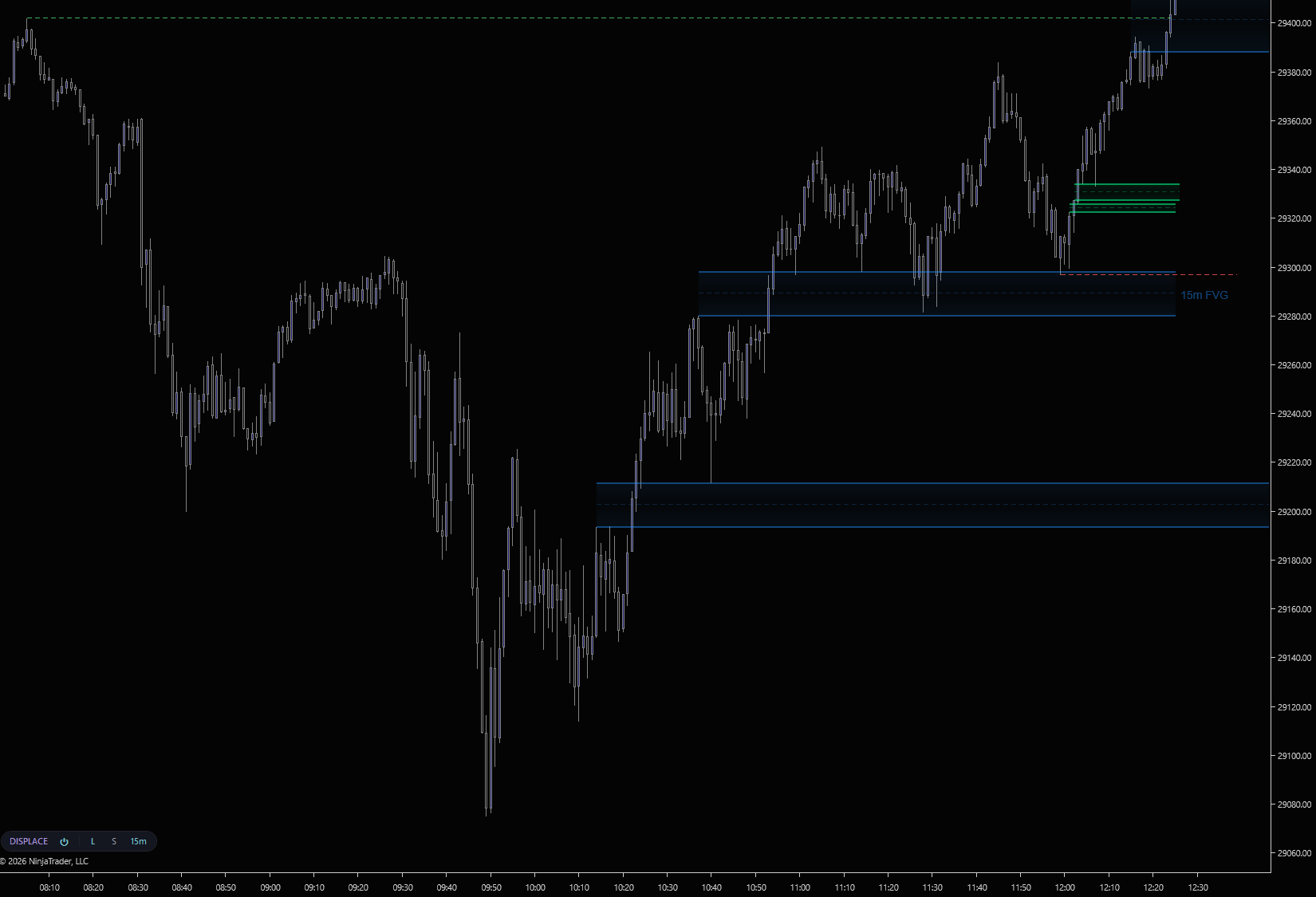
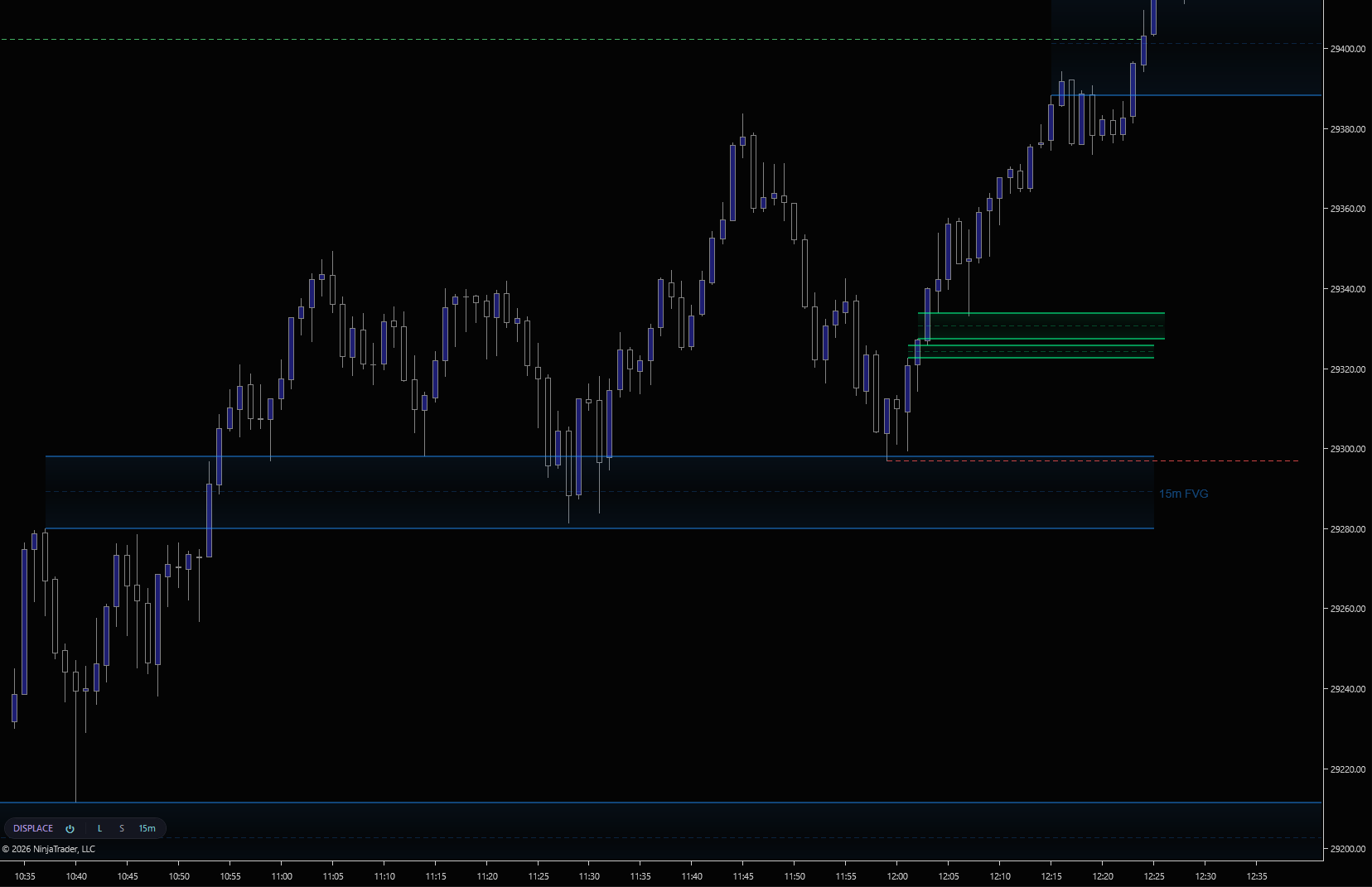
Displace on a 1-minute NinjaTrader 8 chart, 15m FVG context zone in blue with price retracing into it, followed by a stacked chain of expansion gaps on the right, and entry, stop, and target levels plotted in green
A 15-minute FVG forms (blue zone). Price retraces back into the gap. The continuation builds out on the primary timeframe as a stacked chain of displacement FVGs. Displace pre-plots the entry, stop, and target levels in green the moment the second gap confirms. Click to enlarge.
THE MODEL

One trade, three moments.

Most FVG indicators draw a box and call it a signal. The 15m gap by itself tells you nothing about whether institutions will defend it — the information is in the response when price comes back. Displace reduces that response to three moments you can act on.
MOMENT 1 · WAIT
The retrace

A 15m Fair Value Gap prints and price leaves. Nothing qualifies yet. Displace arms only when price comes back and trades into the gap — no retrace, no setup. The “strong move into nothing” trade is filtered out before it exists, and the indicator does the patience for you.

MOMENT 2 · TRIGGER
The second gap

Off the retrace, the first displacement gap anchors a candidate — but single gaps fill inside three bars all the time. When a second qualifying gap stacks in the same direction, that’s displacement, not noise. The model fires: entry, stop, and target publish to the chart and your alert goes off. The plan is complete before you click anything.

MOMENT 3 · RUN
The chain

While the move expands without giving ground, each further gap is the market re-validating the trade — and each opens a fresh entry window. Missed the trigger? The chain gives you another door in. Already positioned? It confirms the add. The fifth gap is the last one tracked: statistically where expansion exhausts, and a sensible place to flatten the runner.

IN THE WILD

From signal to planned trade.

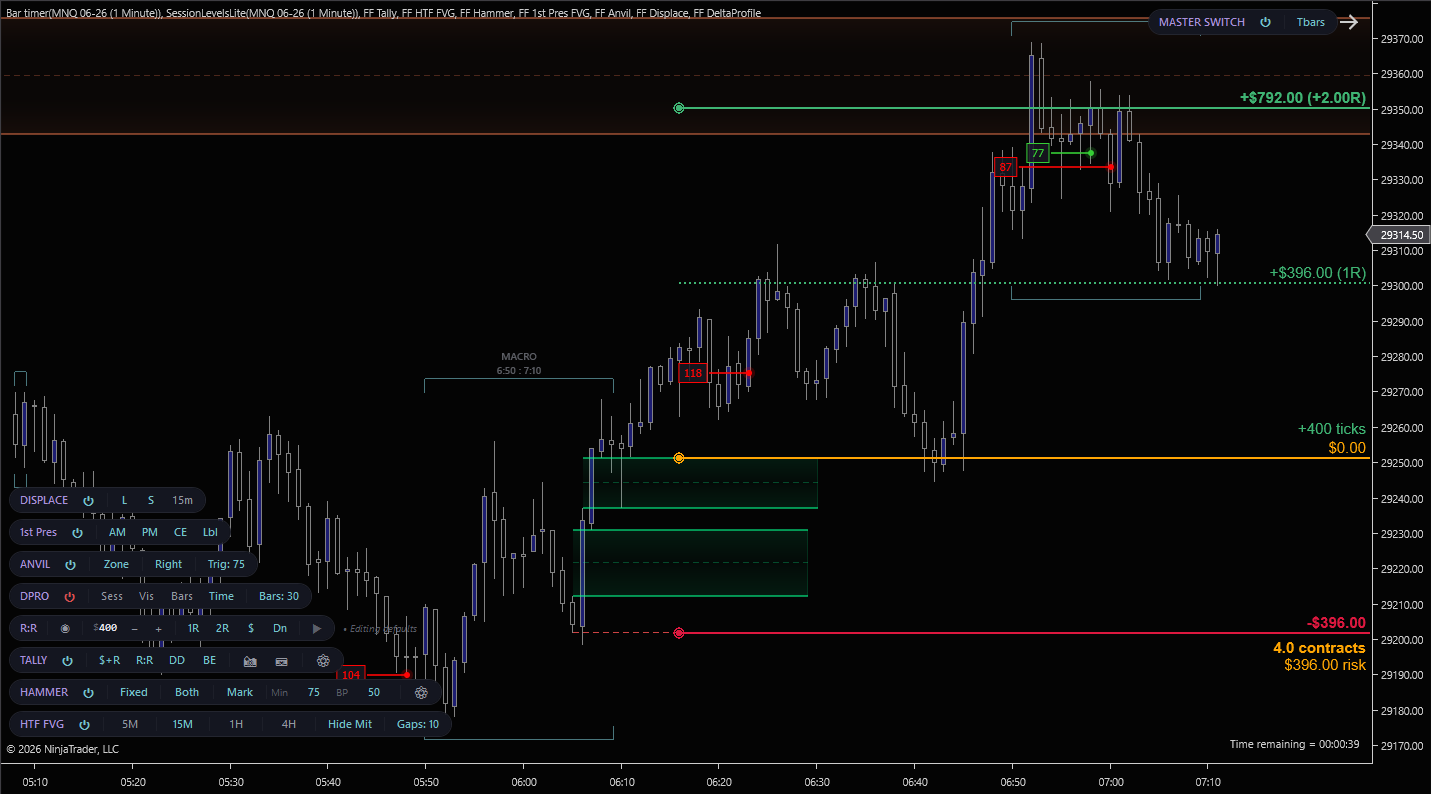
Displace identifies the sequence. Risk/Reward sizes the position and stages the bracket on the chart before you place it. Here’s the workflow on a real MNQ setup. Displace’s continuation zones print first, then R/R drops a planned trade on top: 4 contracts on $396 risk, 1R and 2R targets pre-plotted, waiting for the user to hit Place.
Displace on MNQ. Continuation FVG sequence in green on the left, Risk/Reward drawing showing $396 risk with +$396 (1R) and +$792 (2R) targets, multiple FlowForged toolbar pills stacked at left
MNQ. Displace continuation zones (green, lower left) plus a Risk/Reward planned trade: entry at the orange line, 4 contracts on $396 risk, +$396 (1R) and +$792 (2R) targets staged and ready to fire. Click to enlarge.
CHART TOOLBAR

Long. Short. Context. One pill.

Master power, direction filters, and 15m context visibility. All on a dark-themed pill anchored to your chart toolbar. No dialog, no restart. Detection keeps running while overlays are hidden, so toggling visibility never loses sequence state.
Displace toolbar pill on a NinjaTrader 8 chart. DISPLACE power, L for long setups, S for short setups, 15m for HTF context visibility
The Displace pill on a live chart: power, L / S direction filters, and the 15m context toggle. Click to enlarge.
Master power

Indicator-level on/off. Suppresses all overlays while the engine keeps processing. Toggle back on and every active sequence reappears intact.

Long / Short filter

L and S pills hide bullish or bearish setups independently. Trade one side only without recompiling or restarting the indicator.

15m context toggle

Show or hide the 15-minute FVG zones. Detection keeps running while they're hidden. Turn them back on any time without losing sequence state.

Stackable pill layout

Drag the pill to reorder it relative to Refine, Hammer, and the rest of the suite. Multiple FlowForged indicators stack cleanly on the same chart toolbar.

FEATURES

What you get

Retrace-gated setup logic
Every sequence requires price to retrace into the 15m FVG before any displacement chain qualifies. No retrace, no setup. Eliminates the "strong move into nothing" trades that plague unfiltered FVG tools.
15m FVG context + primary-TF displacement
Two synchronised render layers. The 15m FVGs render as large context zones that establish the displacement framework; the primary-timeframe expansion gaps plot the continuation as it builds. Both layers are toggleable independently.
Five-gap sequence engine
Tracks up to five expansion gaps per sequence. The first anchors, the second confirms the setup and fires the model, and the third through fifth plot as re-entry windows while the move keeps expanding — gated so a fresh entry only appears while the displacement remains intact. Every gap runs through Displace's validation filters before it qualifies.
Auto entry, stop, and target levels
When the trigger gap confirms, Displace publishes a complete trade plan: a defined entry, a structural stop, and a target derived from the 15m framework. All three levels render as dashed lines on the chart and feed Strategy Builder outputs.
Minimum stop-distance filter
Tight stops are usually noise. Set a minimum stop distance in ticks, and any sequence that doesn't clear it is invalidated before it publishes. Eliminates micro-sequences that don't carry enough risk room to be worth taking.
Sound and toast alerts
Get notified the moment the trigger confirms, and again on every re-entry gap. Choose NinjaTrader sound alerts (with a custom .wav), Windows desktop toasts, or both. Long and bearish alerts use direction-coded colors in the popup so you can act without looking at the chart.
Three render styles
Edge Rails (bright top/bottom rails with subtle interior), Gradient Edge (hourglass-fade fill), or Frosted Glass (clean fill with inset border). Each available for both 15m context and displacement zones independently.
Strategy Builder outputs
Four exposed plots. Signal direction, Entry Price, Stop Level, and Target Level. Let you build automated strategies around completed displacement sequences without writing C#. Drop them into Strategy Builder and route them into orders directly.
REQUIREMENTS

What you need to run Displace

RequirementDetails
PlatformNinjaTrader 8 on Windows. No Order Flow+ subscription required.
InstrumentNQ and MNQ. The displacement model is calibrated for NQ/MNQ session dynamics. Tick sizes, volatility profile, and intraday displacement cadence. Running it on other instruments is not supported.
DataStandard data feed. Rithmic, CQG, Kinetick, etc. Displace adds its own 15-minute secondary series; the chart can be any low-timeframe period.
Chart typeDesigned for primary-timeframe execution charts, 1m, tick, range. The 15m FVG context is pulled from the indicator's own secondary series, so chart period is independent.

When the 15m gap fires, you're already late. Unless you know what's next.

Get Displace as part of the FlowForged Suite.

Pairs well with HTF FVG (see the 5m, 1H, and 4H FVGs alongside the 15m context) and Refine (volume-validate the primary-TF displacement FVGs before they form a sequence).

View Pricing ← All Indicators