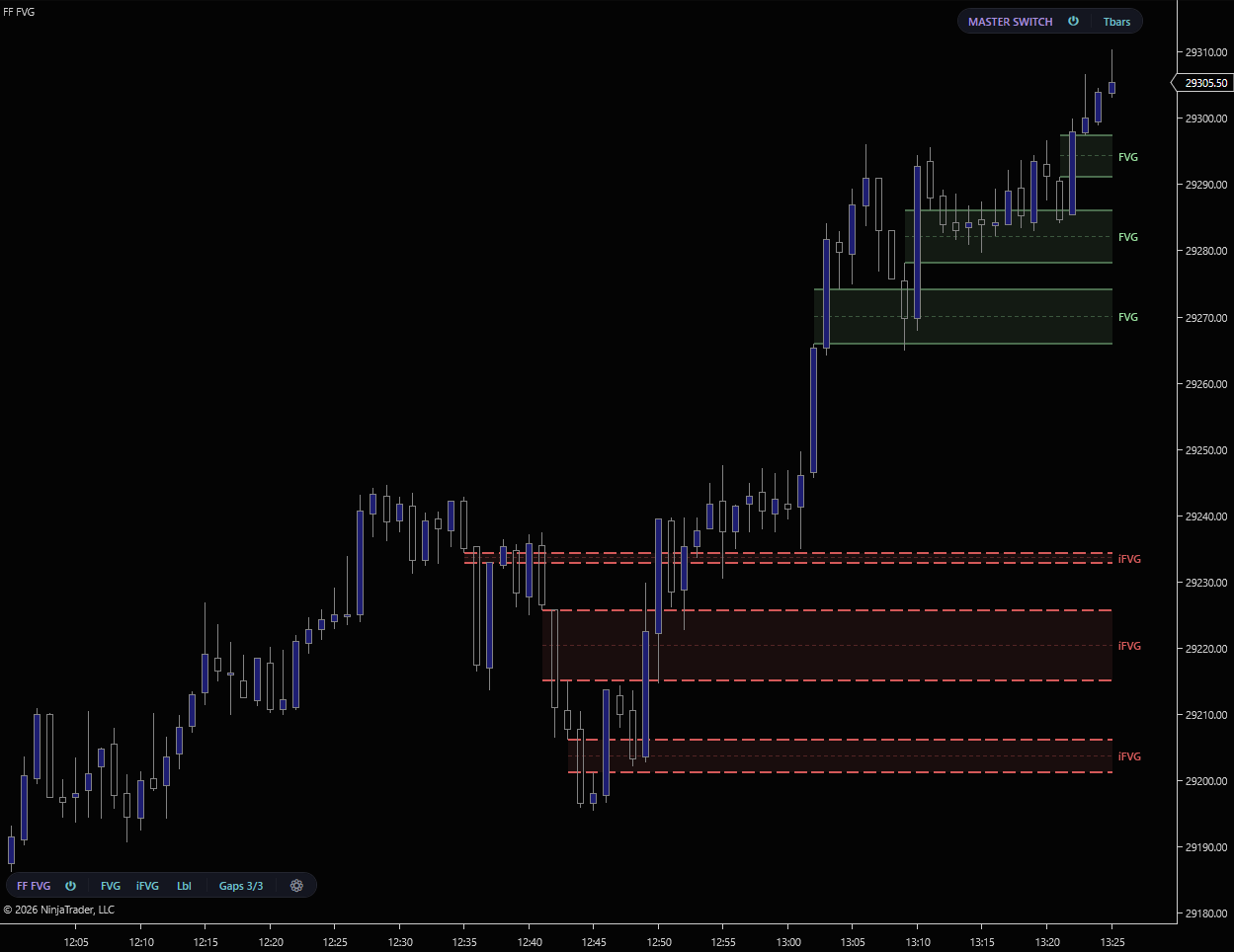
The three-bar inefficiency every ICT model is built around, drawn the moment it confirms. FVG plots bullish and bearish gaps with a gradient-fade fill and luminous edge, watches each one until price mitigates it, then re-renders the mitigated gap as an inversion FVG — same zone, flipped role, dashed brighter border. A clean, fast read on imbalance and where price is likely to react.
Detection runs on bar OHLC only — no Tick Replay, no Order Flow+ license. The middle candle is the displacement that opened the gap.
Every active gap is watched until price trades through its far side. Choose whether a gap counts as mitigated on a wick through the far edge or only on a bar close beyond it.
Turn iFVGs on and a mitigated gap doesn’t disappear — it re-renders in the same color with a dashed, brighter-accent border as an inversion FVG. The level that was support is now resistance, and vice versa. Turn iFVGs off and mitigated gaps are cleared from the chart.
Show both sides or filter to one. A single FVG toggle on the toolbar flips both at once; per-side checkboxes in the settings give you granular control.
Decide what counts as a fill. A wick through the far side for early signals, or a confirmed close beyond it for stricter mitigation.
Mitigated gaps flip into iFVGs with a dashed brighter border, so a level that flipped role stays on the chart and reads at a glance.
Editable “FVG” and “iFVG” labels with a master on/off, and an optional consequent-encroachment line marking the 50% of each gap.
Power, FVG, iFVG, Labels, the Gaps render-cap popup, and the theme gear all live on a pill in the chart toolbar. Part of the FlowForged Master Switch system.
Direct2D rendering with cached brushes and stroke styles. Gradient-fade fills and luminous edges paint without flicker, even with dozens of zones on the chart.
FVG is free. No credit card, no trial period, no strings.
We’ll send the download link and occasional updates about new free tools. Unsubscribe anytime.
| Requirement | Details |
|---|---|
| Platform | NinjaTrader 8 on Windows. No Order Flow+ subscription required. |
| Data feed | Any NinjaTrader-compatible data feed. Rithmic, CQG, Kinetick, etc. |
| Tick Replay | Not required. Detection uses bar OHLC only, so the indicator runs on standard chart data. |
| Chart type | Works on any instrument and any standard bar type. Detection confirms on the close of each bar. |
FVG marks every three-bar gap on your execution chart. The paid suite goes further — Refine validates FVGs against relative volume so you only watch the ones that mattered, and HTF FVG projects 5m, 15m, 1H, and 4H gaps down ont