Free NinjaTrader 8 Indicator

Killzone-anchored volume profiles. Tick-built. Kept on the chart.

Real volume profiles anchored to the sessions ICT traders actually trade. NY, London, Asia, or the full overnight window. Each profile is reconstructed from raw tick data (no aggregation shortcuts), the POC and Value Area lock in at the close, and up to 50 prior profiles stay on the chart so the structure that price respected last week is still right there. One install now ships two profiles on two separate toolbar pills — the session Volume Profile, and a right-margin per-price Delta Profile.

Volume Profile pill Delta Profile pill
VOLUME PROFILE · FIRST PILL

The classic profile. Done properly.

Volume-at-price profiles anchored to whichever global session matters most to you. POC, VAH, and VAL are calculated and drawn automatically. Run it in pure Volume mode, BuySell mode to see aggressor splits, or Delta mode for the net imbalance. Switchable live from the chart toolbar.
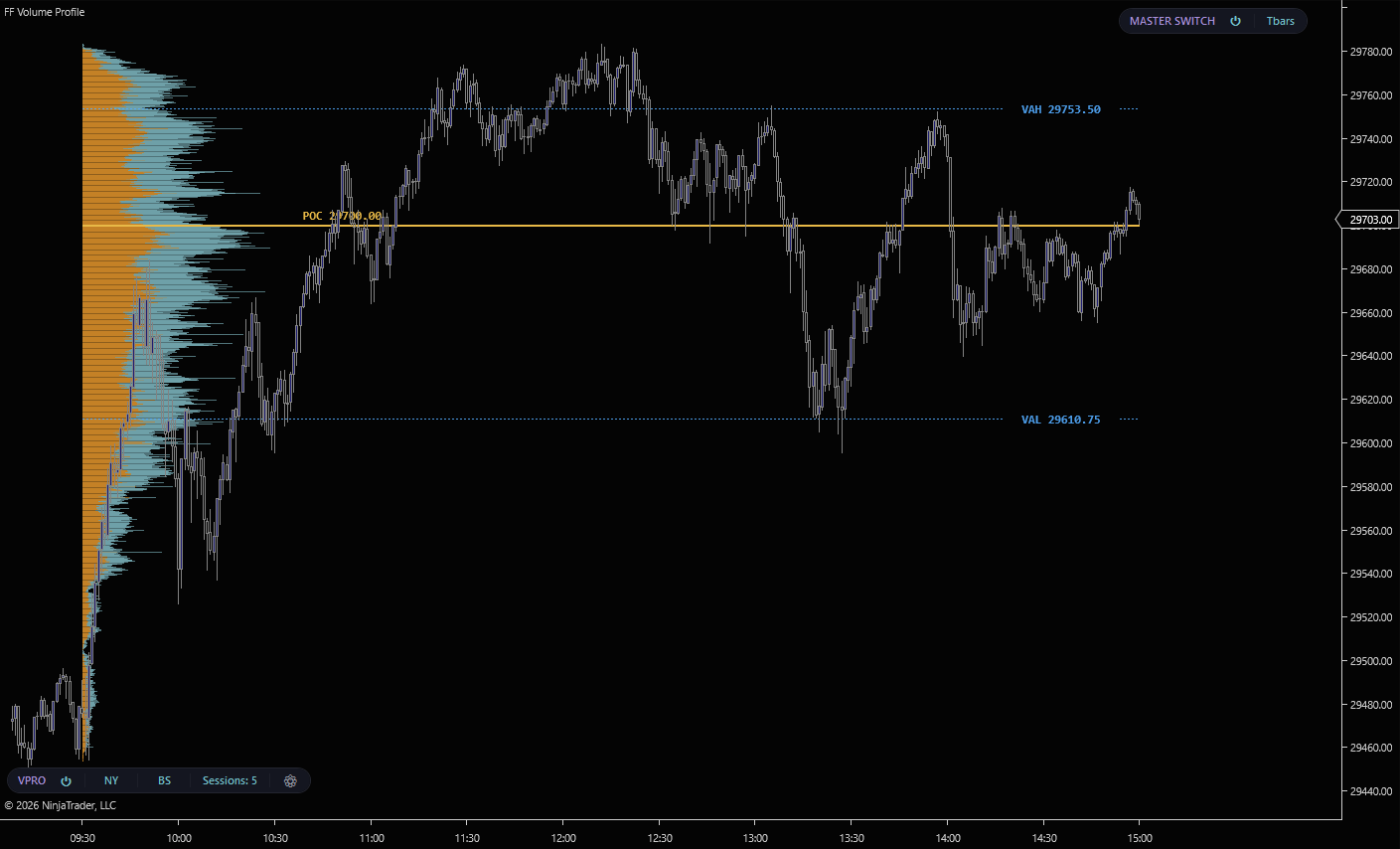
FF Volume Profile on a NinjaTrader 8 chart. NY session profile in Buy/Sell mode showing POC at 29700.00, VAH 29753.50, VAL 29610.75
NY session profile in Buy/Sell mode. Aggressor-classified bars at every price, POC at 29700.00, VAH at 29753.50, VAL at 29610.75 with dashed Value Area lines.
Four session anchors

All four sessions accumulate in parallel from raw tick data, so flipping between them is instant. No recalc, no waiting.

NY
New York
09:30 – 16:00 ET
The primary US futures session. The profile most retail traders care about. It's where institutional flow concentrates and where most structural levels print.
London
London
03:00 – 09:30 ET
European session profile. Captures the London handoff and pre-NY positioning. Often sets the levels NY then reacts to at the open.
Asia
Asia
18:00 – 03:00 ET
Overnight Asia session, including the Tokyo and Sydney windows. Quieter volume profile but the levels it leaves behind often act as targets or stops the next day.
Overnight
Overnight (Asia + London)
18:00 – 09:30 ET
Continuous window from Asia open through London close. One unified pre-NY profile. Everything that built up before the cash session opens.
Three display modes
Volume

Classic volume profile. Total traded volume at each price level. One bar per row showing where the auction concentrated. The traditional read for finding high-volume nodes and low-volume rejection zones.

BuySell

Aggressor split at every price. Each row shows market buys vs market sells separately. See which side dominated the auction at each level. The mode pictured above.

Delta

Net delta at each price level. The difference between aggressive buys and sells, shown as a single signed bar per row. The fastest read for spotting imbalance against structural levels.

POC + Value Area drawn automatically. The point-of-control row shows as a solid line, with VAH and VAL marked by dashed lines labelled with their exact prices. Configure the Value Area percentage in settings (default 70%).
DELTA PROFILE · SECOND PILL

One indicator. A second profile.

Volume Profile now bundles a standalone Delta Profile on its own toolbar pill. Where the volume profile shows how much traded at each price, the Delta Profile shows the imbalance — net aggressive buying versus selling at every price level, drawn as a histogram in the right margin of your chart. Separate from the volume profile’s Delta display mode, it carries its own period modes and its own point-of-control.
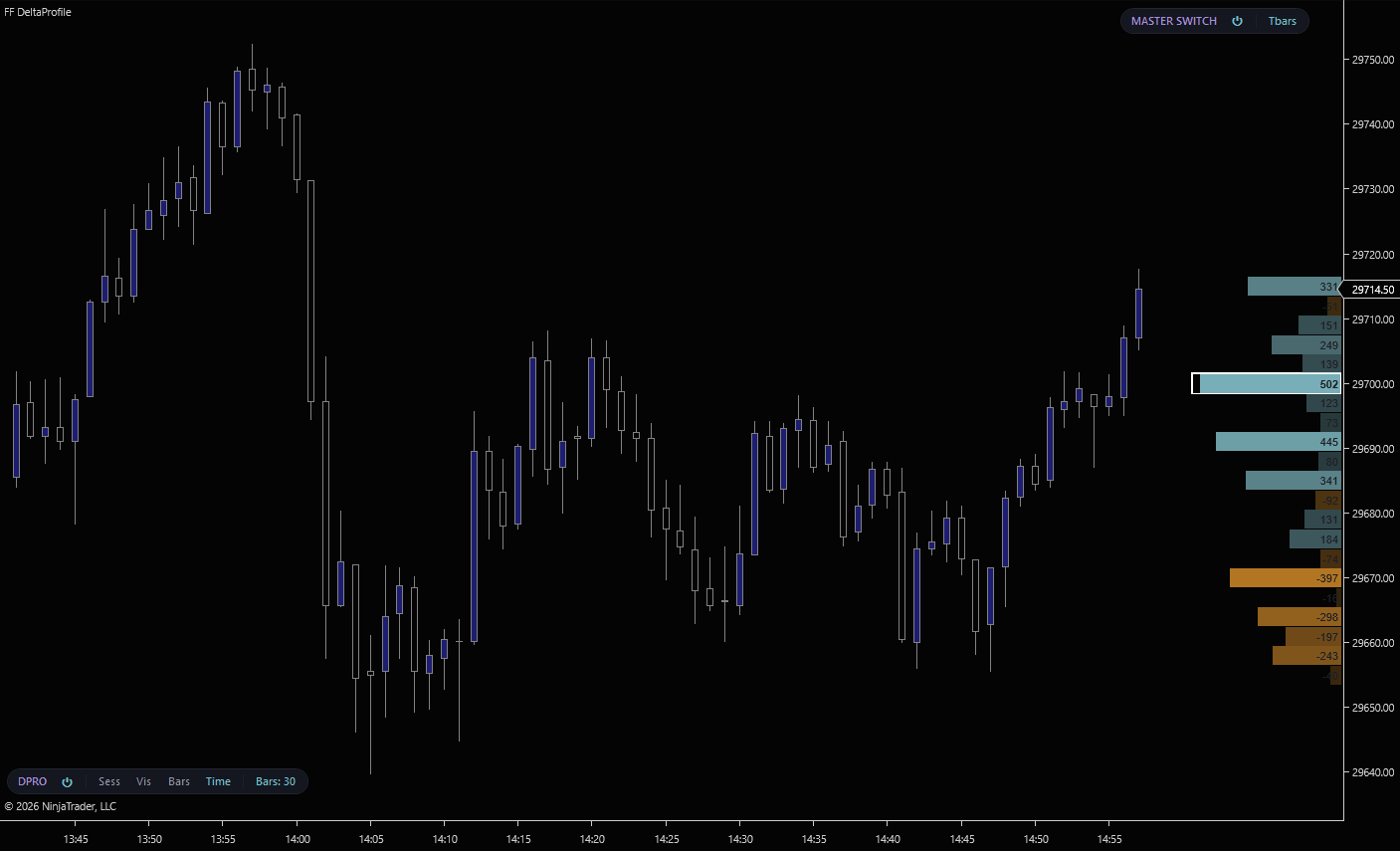
Delta Profile pill on a NinjaTrader 8 chart. Right-margin per-price net delta histogram with steel-teal positive bars, amber negative bars, and a delta POC outline
The Delta Profile pill on a 1-minute chart. Steel-teal bars show net buying at each price, amber bars show net selling. The 502-contract row is the delta point-of-control, the price where the heaviest net delta transacted.
Four period modes
SESS
Session
Accumulates delta from the current session open onward. The cleanest read for intraday traders. Resets every session, shows you who’s won the session so far.
VIS
Visible Bars
Builds the histogram from whatever bars are currently on screen. Pan or zoom and the profile rebuilds. Useful for analysing a specific swing or range without changing chart settings.
BARS
Last N Bars
Rolling window of the most recent N bars. Set N to 30 for a recent-context read, 200 for a broader scope. Updates as new bars print.
TIME
Custom Time
Specify N minutes or hours and the profile accumulates over that rolling window. The right tool when “session” is too coarse and “last N bars” depends on bar period.
What’s on the chart
Net delta bars

One bar per price row, extending from a center axis. Positive (net buying) renders in the theme’s positive color, negative (net selling) in the negative color. Bar length is proportional to the net delta. One glance tells you the dominant side at every level.

Delta POC outline

The row with the highest absolute net delta is automatically outlined. The point of control for delta, not for volume. The price where the largest order-flow imbalance transacted, and where the next test is most likely to react.

Numeric labels + min-delta filter

Every row shows its net delta value next to the bar, so you read exact numbers without estimating. Suppress rows below a minimum-delta threshold to keep the histogram focused on the levels with real imbalance.

Tick grouping. Set the tick interval to combine N price levels per row. Group 4 ticks per row on NQ to read structural levels instead of per-tick noise. Switch the Session, Visible, Bars, and Time modes live from the Delta Profile pill.
FEATURES

Built for session traders

Up to 50 historical profiles

Each session retains up to 50 completed profiles. Scroll back through weeks of NY sessions and see every prior POC and Value Area on the chart. The levels that have been respected, broken, or revisited.

11 built-in themes

FlowForged, Classic, HighContrast, Neon, Ember, Glacier, Obsidian, Blueprint, Terminal, Stealth, and Custom. Every theme picks coordinated POC and Value Area colors so the profile reads cleanly against any chart background.

Toolbar pill controls

Session, Mode, and the full settings panel all live on a pill in the chart toolbar. Hover the Session button to pick from a popup list; the gear opens defaults (placement, direction, opacity, VA%, theme).

Placement + direction

Left or right anchor, bars extending left or right. Four layout combinations. Pin the profile against the price scale, the session boundary, or wherever it stays out of your way.

L1-only aggregation

Aggressor classification is computed from Level 1 OnMarketData. No Order Flow+ license required. Works with any standard NinjaTrader data feed.

SharpDX rendered

Direct2D rendering with cached brushes and stroke styles. Hundreds of price levels across 50 historical profiles paint without flicker or lag.