Trade Planner & One-Click Order Placement

From inside-the-FVG entry to live bracket. Without leaving the chart.

Click an entry. Inside the gap, on the OB, wherever the model puts you. Set a stop above the last untouched high or below the sweep low. Risk/Reward sizes the position to the dollars you’re risking, draws the stop and targets with live $ and R, and submits the full bracket to your broker with one click. No Chart Trader. No DOM dance. No mental math while the candle is still open.

Live Order Placement Auto Position Sizing Snap-to-Bar Pairs with Tally
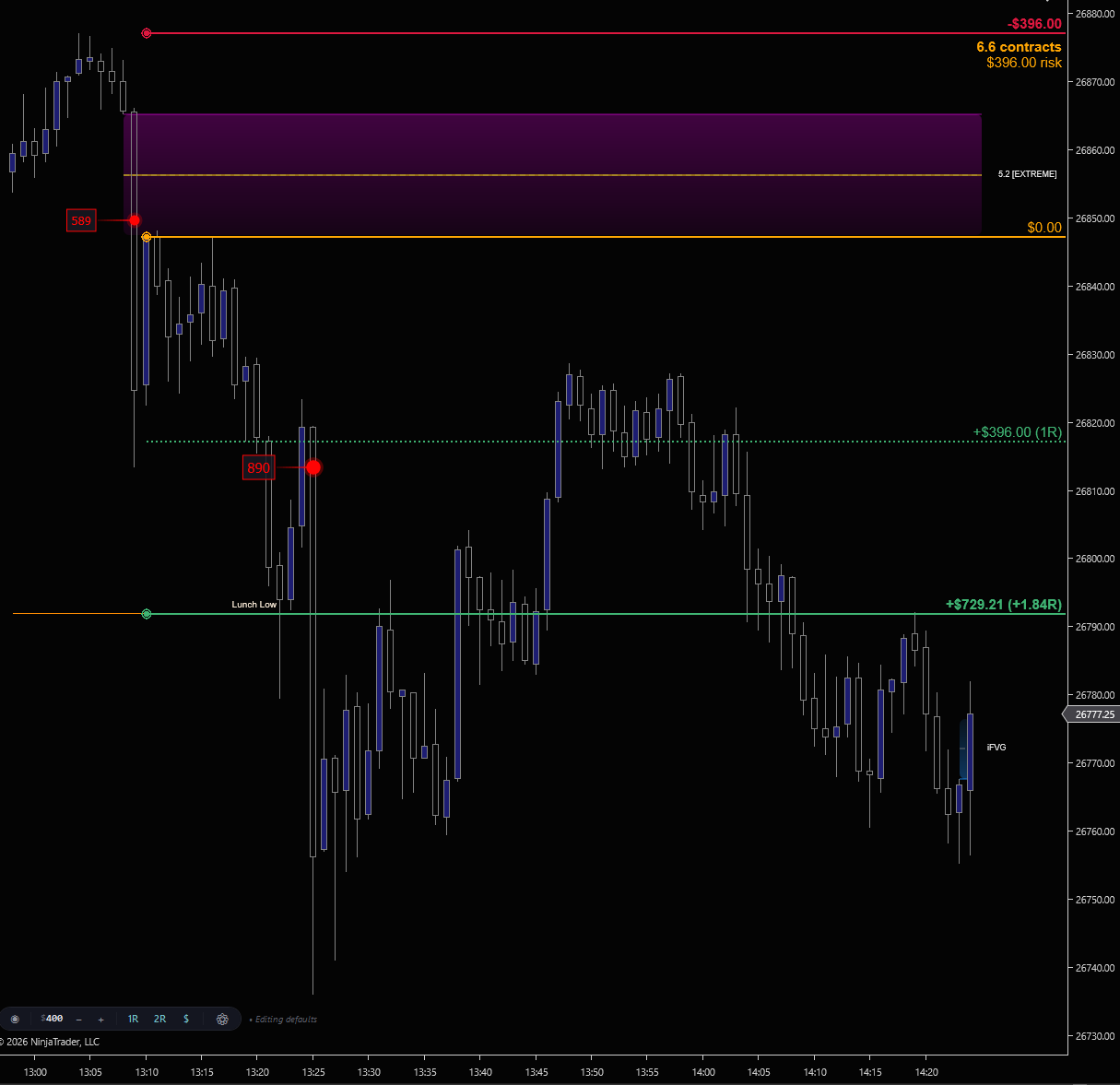
Risk/Reward drawing on a NinjaTrader 8 chart. Short setup with $396 risk on 6.6 contracts, stop at the 5.2 extreme above entry, 1R target at +$396 and 2R-anchor target at Lunch Low (+$729.21 / +1.84R). Hammer marks at 589 and 890 lots confirm the entry
Risk/Reward on a live short setup. The pill is set to $400 risk. The tool draws 6.6 contracts behind the stop above the 5.2 extreme, the 1R line at +$396, and the 2R-anchor target at Lunch Low (+$729.21 / +1.84R). Hammer’s 589 and 890-lot prints inside the entry confirm the move. Click to enlarge.
THE WORKFLOW

From plan to placed in four clicks.

Every other trade planner asks you to do the math. Set a stop distance, calculate the contract count, manage the bracket through Chart Trader. Risk/Reward inverts that. You set the dollars you're willing to lose. The tool sizes the position.

Type your dollar risk into the pill. Click an entry on the chart. Drag the stop. Risk/Reward instantly draws contract count, dollar P&L at every level, R-multiples on each target, and a tick distance tracker. Adjust the risk amount and every label re-prices in real time.

When you're ready, hit ▶ Place. The full bracket. Entry, stop, and every target. Submits to your broker as native NinjaTrader orders. Working orders show in Chart Trader. Cancel the bracket with one click. Optionally have the drawing auto-clear after fill so the chart stays clean.

The four-click trade
1
Set the dollar risk
Type into the pill or step in $50 increments. The pill is the single source of truth. Every drawing reprices instantly.
2
Click the entry
Snap-to-bar anchoring locks the entry to the nearest candle landmark within your configurable pixel radius.
3
Drag the stop
Stop distance and contract count update live as you drag. 1R and 2R targets auto-place; drag any target to customize.
Hit Place
Full bracket submits to your broker. The pill flips to ✕ Cancel until the trade closes.
SEE IT IN ACTION

From a clicked entry to a live, managed trade.

Risk/Reward draws the plan and submits the bracket. Tally picks up the moment the orders fill: live $, R, and points on every leg, a break-even line that actually moves as partial exits lock in profit, and an R:R verdict panel grading the trade in real time. Together they cover everything between “here’s where I’m getting in” and “the last leg just closed.”
ES, live trade. Plan the entry with Risk/Reward, hit Place to submit the bracket, then Tally takes over with live P&L, R-multiples, dynamic break-even, and the R:R verdict panel until the last leg closes.
CHART TOOLBAR

Every control on one pill.

No dialogs, no Chart Trader fumbling. The Risk/Reward pill sits on your chart toolbar with every control you need to plan and place the trade. A small "Editing defaults" indicator tells you whether your next toggle edits the selected drawing or the chart-wide default.
R:R| $500 +| 1R 2R $| Dn|
• Editing defaults
◎ New drawing

Starts a fresh R/R drawing. Click an entry on the chart, then a stop. The target auto-places at 2R and is fully draggable.

$<risk> − +

Your dollar risk. Click the value to type, or use the steppers in $50 increments. Every drawing reprices instantly.

1R / 2R toggles

Show or hide the 1R and 2R reference lines on the selected drawing, or on the chart-wide default when nothing's selected.

$ / pt toggle

Switch every label between dollar values and price points. Same dual-mode behavior as the R toggles.

Up / Dn rounding

Controls how contract count rounds to hit your risk budget. Dn (default) never exceeds budget. Up may go over by one contract's worth.

▶ Place / ✕ Cancel

Submits the full bracket as live broker orders. While working, the button flips to ✕ Cancel and kills every working leg in one click.

FEATURES

What you get

Live broker order placement
One click submits a complete bracket. Entry, stop, and every target. As native NinjaTrader orders to your connected account. A confirmation dialog gates the submit. Working orders show in Chart Trader and the pill flips to Cancel mode until the trade closes. Pre-submit guards block invalid placements (zero qty, no account, instrument mismatch) with a tooltip explaining why.
Risk-first position sizing
Set the dollars you can lose, not the contracts you want. The tool calculates the contract count required to hit that risk budget on every drawing automatically. Change the budget on the pill and every drawing reprices instantly. Configurable rounding mode controls whether you slightly under-size or slightly over-size when contracts don't divide cleanly.
Snap-to-bar anchoring
Entry and stop anchors snap to the nearest candle landmark. Open, high, low, or close. Within a configurable pixel radius (default 16 px, range 1–64). Drawings lock to structural levels instead of arbitrary intra-bar prices. Disable snap when you need a precise off-bar level.
Live dollar P&L and R-multiple labels
Every level on every drawing shows its exact dollar outcome alongside its R-multiple. Stop displays the max loss, breakeven sits at the entry, each target shows its dollar gain and R-multiple. Switch labels to points-only with one toggle. All values recompute live as you drag any anchor.
Signed tick tracker
Optional readout per drawing showing the signed tick distance from entry to current price. Positive when price moves favorably, negative when adverse. Useful for live exit timing without needing to read the price axis.
Auto-clean after fill
When the bracket fills, the R/R drawing auto-removes from the chart so the surface stays clean. NinjaTrader continues to render working stop and target orders natively, and Tally takes over for live trade-management labels. Toggle off if you prefer the drawing to remain visible during the trade.
Defaults popup & per-drawing override
The defaults popup configures every new drawing's behavior. Risk amount, target visibility, snap mode, snap radius, contract-count display, tick tracker, auto-clean. In one place. Per-drawing edits via the pill always override defaults; the "Editing selected" vs "Editing defaults" label tells you which is active.
Stacks with the rest of the suite
The pill shares the unified FlowForged toolbar system. Master Switch toggles every FF indicator at once, pill order persists across NinjaTrader restarts via side-file, Ctrl+Alt+T keyboard shortcut available. Pair with Tally for live in-trade P&L tracking after Place fires.
REQUIREMENTS

What you need to run Risk/Reward

RequirementDetails
PlatformNinjaTrader 8 on Windows. No Order Flow+ subscription required.
BrokerAny NinjaTrader-compatible broker for live order placement. Rithmic, CQG, Continuum, Apex, Topstep, TopOne, etc. Drawing and sizing features work in simulation mode without a live account.
InstrumentAny futures contract supported by NinjaTrader 8. ES, MES, NQ, MNQ, YM, MYM, CL, MCL, RTY, M2K, GC, MGC, and any other instrument with a defined tick value.

Plan it. Place it. Manage it.

Get Risk/Reward as part of the FlowForged Suite.

Pairs perfectly with Tally. Once Place fires, Tally takes over with live break-even tracking, locked-in profit, and a real-time R:R verdict panel.
View Pricing ← All Indicators