Live Trade Management Overlay

The trade is live. The chart is keeping score.

Once the bracket fills, Tally takes over. It reads the working orders directly from your connected account and shows live $, points, ticks, and R on every leg. The break-even line actually moves as partial exits lock in profit. The R:R verdict panel grades the position in real time. Earning its risk or not, and when the last leg closes, the chart is screenshotted into a dated folder, so the journal builds itself while you trade the next setup.

Per-Order Labels Dynamic Break-Even R:R Verdict Panel Auto-Screenshot
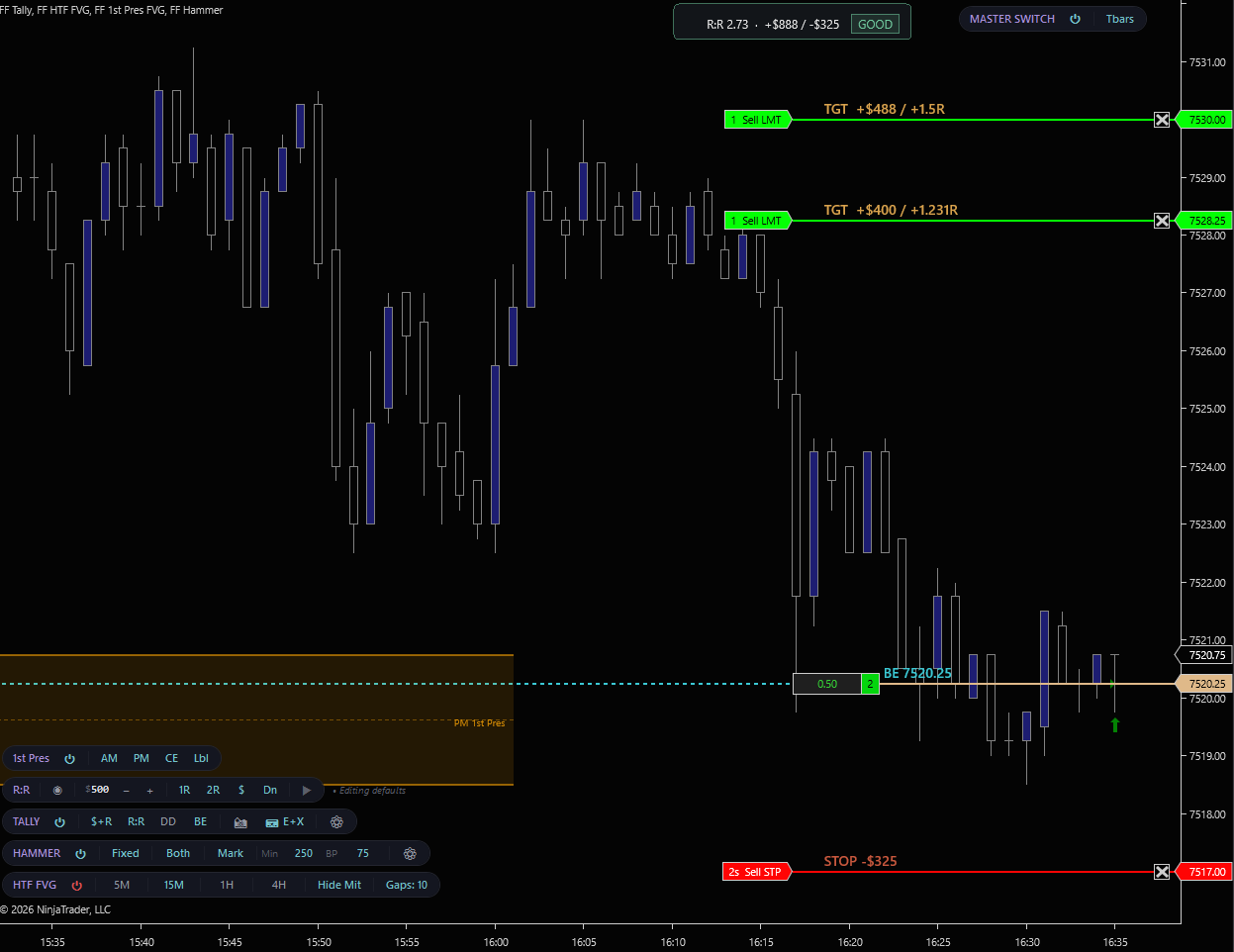
Tally on a NinjaTrader 8 ES chart. R:R 2.73 GOOD verdict, two limit targets labeled +$488/+1.5R and +$400/+1.231R, stop at -$325, break-even line at 7520.25 with +$0.50 locked-in profit
Tally on ES. R:R 2.73 [GOOD], two targets at +1.5R and +1.231R, stop at -$325 (trailed up from -$500). Break-even line at 7520.25 reflects $0.50 of locked-in profit from a partial. Click to enlarge.
SEE IT IN ACTION

Risk/Reward sets the trade. Tally runs it.

Watch the two indicators work together on a live ES trade. Risk/Reward plans the bracket, Place fires the orders, and Tally takes over with live P&L, a dynamic break-even line, and the R:R verdict panel updating with every fill.
Risk/Reward and Tally working together on an ES position. Bracket placement, live break-even adjustment, R:R verdict updates.
CHART TOOLBAR

The whole overlay on one pill.

Every overlay element. Per-leg labels, R:R panel, break-even line, account stats, screenshot mode. Toggles from a single chart toolbar pill. No dialogs, no restarts.
TALLY | $+R R:R DD BE| 📷 E+X|
⏻ Master power

Indicator-level on/off. Suppresses every Tally overlay element while account tracking keeps running. Turn it back on and the live state is right there.

$+R units cycle

Cycle label content between $+R (dollars + R-multiples) and pt+R (points + R-multiples). Property grid exposes ticks too. Mix and match displays "Cust".

R:R panel

Toggle the aggregate R:R panel in the chart's top-right corner. Three styles: Verdict tier badge, Bar proportional split, or Compact single-line.

DD account row

Show or hide the Day P&L and trailing drawdown row beneath the R:R panel. Auto-hides when the broker doesn't expose the value (no "$0" noise).

BE line

Toggle the dynamic break-even line and its label. The line advances toward profit as partial exits lock in dollars.

📷 Snapshot now

One-click chart capture to your screenshot folder, regardless of auto-capture mode. PNG, named with timestamp and instrument.

E+X auto-capture

Cycles auto-capture mode: OffEntry onlyEntry + Exit. Captures fire 250 ms post-event so labels are rendered.

⚙ Settings

Theme picker, label side (left/right), screenshot folder, pill stacking order. All in one popup.

R:R VERDICT

Six tiers. Live.

The verdict panel grades your live aggregate risk/reward against the working bracket every snapshot. Reward divided by risk, with two special states layered on top, RISK-FREE when every stop sits at or beyond break-even, and missing-leg states when a stop or target hasn't been placed.
[POOR]R:R < 1.0Risk exceeds reward. The trade is paying you less than it can cost you.
[OK]1.0 – 2.0Acceptable. Reward at least matches risk. Viable for high-win-rate setups.
[GOOD]2.0 – 3.0Solid asymmetry. Two units of reward against one of risk. The standard target for most discretionary setups.
[EXCELLENT]≥ 3.0High-conviction asymmetry. Three or more units of reward per unit of risk.
[RISK-FREE]stop ≥ BEEvery working stop sits at or beyond break-even. The worst-case exit nets non-negative dollars. The trade can't lose from here.
DYNAMIC BREAK-EVEN

A break-even line that actually moves.

Most trade managers draw break-even at your entry price and leave it there. Tally treats break-even as a live calculation. As partial exits fill and lock in profit, the break-even line shifts in the favorable direction by the exact amount that profit covers your remaining open risk.

Configure a per-round-turn commission and the line pushes back by the commission's price-distance so you see the exit that actually nets to zero after fees, not the textbook entry price.

The label reads BE 7520.25 (+$320 locked) when partial profit is locked in. When every working stop is at or past BE, the label flips to RISK-FREE 7520.25 in the theme's risk-free color.

How it advances
  1. Entry fill: BE = entry price (plus commission offset if configured).
  2. Partial exit fills at profit: realized profit is booked. BE shifts by locked_profit ÷ remaining_qty ÷ point_value in the favorable direction.
  3. Stop trailed past BE: the worst-case exit now nets positive. Verdict flips to RISK-FREE.
  4. Position flat: BE state clears. Snapshot resets for the next trade.
Sanity-protected. A target limit on the wrong side of entry (e.g. a pullback-add limit below a long entry) is reclassified to a stop so the BE math doesn’t double-count it as a winner.
THEMES

Six built-in palettes.

Profit, loss, and break-even colors are tuned per theme so the overlay reads cleanly against any chart background. All themes carry their own R:R verdict tier ramp and account-row palette. Pick the one that matches your taste.
Forge · default

FlowForged brand: gold profit, ember loss, steel-cyan break-even. Tier ramp ember → gold → mint.

Classic

Conventional trading colors. Lime-green profit, orange-red loss, dodger-blue break-even, gold for the "acceptable" tier.

Stealth

Muted whites and grays, no background fills, transparent label boxes. Data invisible until you look for it.

Obsidian

Sleek dark editor look. Warm-white text on near-black, single cool-cyan accent. Hierarchy through brightness rather than hue.

Nordic

Nord palette. Frost-green profit, frost-red loss, frost-cyan accent. Low-saturation arctic feel designed for long sessions where loud color is fatiguing.

Carbon

IBM Carbon-inspired. Graphite tones, professional dashboard palette. Hue reserved for state, not decoration.

FEATURES

What you get

Live per-leg labels
Every working stop, limit target, and break-even leg gets a label showing dollars, points, ticks, and R-multiples in any combination. Multi-leg ATM brackets render each leg separately; multiple orders at the same price merge into one labeled leg with summed qty.
Live 1R recomputation
1R is recalculated every snapshot as the current total dollar risk from all working stops. Not a frozen-at-entry value. Tighten a stop mid-trade and the same dollar target shows a larger R-multiple instantly. Matches how active traders actually think about R during management.
Dynamic break-even line
A live price line that advances toward profit as partial exits lock in dollars, and pushes back by configurable per-round-turn commissions. Label switches to "RISK-FREE" when every working stop is at or past break-even. The verdict panel mirrors the state.
R:R verdict panel, three styles
Aggregate reward/risk graded into six tiers (POOR / OK / GOOD / EXCELLENT / RISK-FREE / missing-leg). Three render styles, Verdict badge, Bar proportional split visualization, or Compact single-line. The panel updates the moment you trail a stop or adjust a target.
Account-level stats row
Day P&L and trailing drawdown pulled from the connected account and shown under the R:R panel. Auto-suppresses when the broker doesn't populate the value. No fake "$0" placeholder. Critical context for funded-account traders working against firm-imposed loss limits.
Auto-screenshot on entry & exit
Off / EntryOnly / Entry+Exit modes. When set to capture, Tally saves a PNG of the chart 250 ms after each position event so the new TGT, STOP, and BE labels are rendered into the image. Files land in Documents\NinjaTrader 8\Tally Screenshots\<yyyy-MM-dd>\HHmmss_<sym>_<entry|exit>.png. Date folders roll at 6 PM ET to match CME globex trading-day grouping.
Auto-follows Chart Trader's account
No account dropdown to manage. Tally subscribes to every connected account and tracks whichever one the chart's Chart Trader is pointed at. Switch the chart's account and Tally's labels and R:R panel refresh against the new position. Multi-account workflows stay isolated. Each chart shows its own account's state.
Smart leg classification
Limit orders on the wrong side of entry (pullback-add limits) auto-classify as stops so the verdict panel doesn't show phantom targets behind the market. Stop orders that get trailed into profit remain classified as stops so the RISK-FREE detector reads them correctly.
Stacks with the rest of the suite
Tally's pill shares the unified FlowForged toolbar system. Master Switch, draggable reorder, Ctrl+Alt+T toggle. Pair with Risk/Reward for the full workflow: R/R plans and places the bracket, Tally manages it live.
REQUIREMENTS

What you need to run Tally

RequirementDetails
PlatformNinjaTrader 8 on Windows. No Order Flow+ subscription required.
Broker / accountAny NinjaTrader-compatible broker. Tally reads working orders, position state, and account metrics directly via NT's account API. Day P&L and trailing drawdown are only available from brokers that publish them (Apex, Topstep, TopOne, Rithmic-backed accounts).
InstrumentAny futures contract supported by NinjaTrader 8. ES, MES, NQ, MNQ, CL, MCL, GC, MGC, RTY, M2K, YM, MYM, NG, and any other instrument with a defined point value.
Chart typeAny time-based, tick, range, or volume chart. Tally's labels and lines are placed by price, not by bar index. The indicator is timeframe-agnostic.

The trade is live. Tally manages the math while you watch the chart.

Get Tally as part of the FlowForged Suite.

Pairs perfectly with Risk/Reward. Plan and place the bracket with one indicator, manage it with the other.
View Pricing ← All Indicators