Higher-Timeframe Fair Value Gaps

The bias lives on the 15m. The execution lives on the 1m.
Both, on one chart.

You scalp the 1-minute. Your bias is on the 15m and 1H. HTF FVG pulls 5m, 15m, 1H, and 4H Fair Value Gaps onto the chart you’re actually trading. Edge rails, CE lines, mitigation tracking, the whole structure, so the gap that drives your bias is sitting on the candle you’re entering on. Toggle any timeframe from the chart toolbar. No chart-flipping. No eyeballed levels. No second window costing you a tick.

Historical + Real-Time 5m · 15m · 1H · 4H SharpDX Rendered No OF+ Required
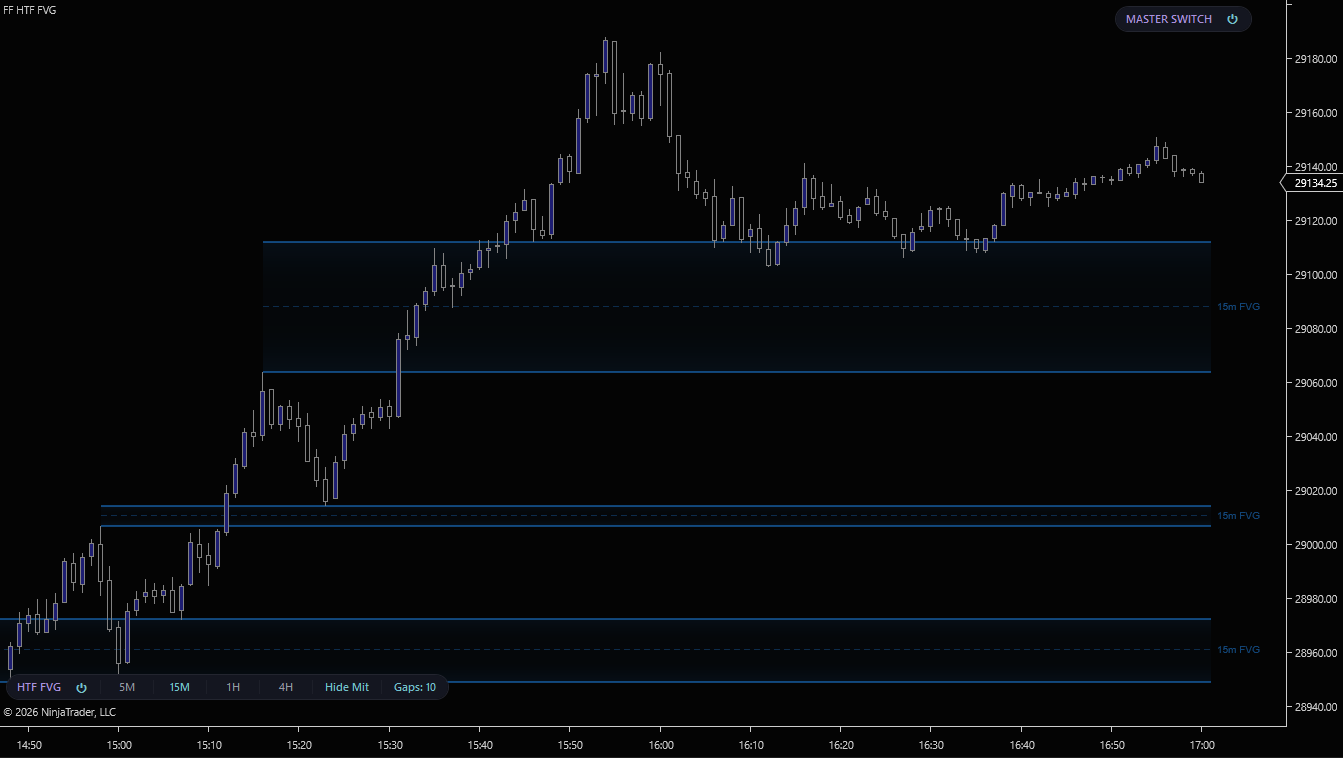
HTF FVG, 15-minute Fair Value Gaps drawn on a 1-minute NinjaTrader 8 chart with edge rails and CE lines
15-minute Fair Value Gaps overlaid on a 1-minute execution chart. Edge rails mark the gap boundaries; the dashed CE line marks consequent encroachment. Click to enlarge.
THE PROBLEM

The gap on the right timeframe is on the wrong chart.

You scalp on the 1-minute. But the imbalance that's going to drive the next leg formed on the 15-minute, or the 1-hour. Without that context on the chart you're actually trading, you're either flipping back and forth between two windows, eyeballing levels in your head, or missing the only Fair Value Gap that mattered for the entire session.

HTF FVG runs four secondary data series in parallel, 5m, 15m, 1H, and 4H, and projects every gap forward onto your execution chart. The zones stay live until price mitigates them. The CE line marks the midpoint where institutions typically re-engage.

Toggle each timeframe from the chart toolbar without restarting the indicator. Stack 15m + 1H during the morning session, pull 4H in for the daily bias check, drop everything but 5m when you want to keep it tight.
Without HTF FVG
Flipping between 1m and 15m charts mid-trade
Hand-drawing horizontal lines that never update
Missing the 1H gap that became the bounce of the session
With HTF FVG
5m, 15m, 1H, 4H gaps drawn live on your execution chart
Zones auto-extend forward and dim when mitigated
Toggle any timeframe on or off from the chart toolbar. No restart, no dialog
FOUR TIMEFRAMES

One indicator. Four lenses.

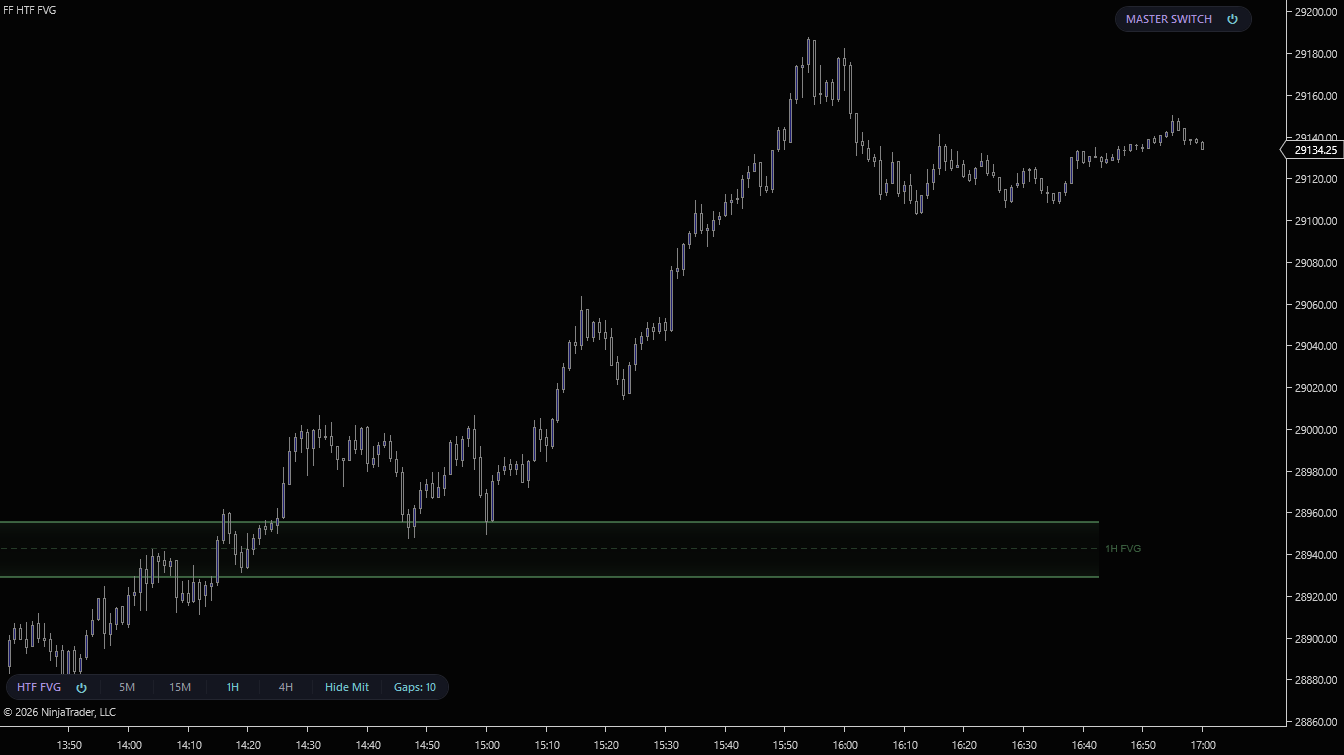
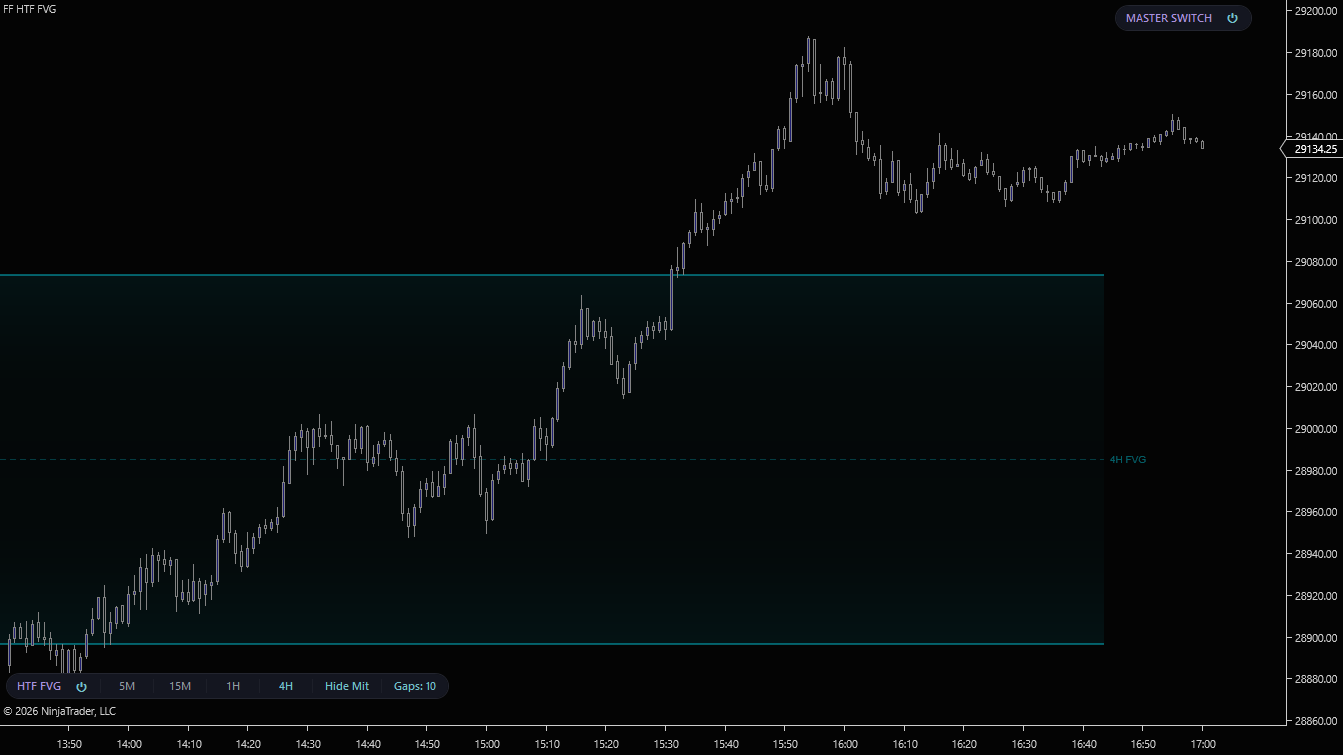
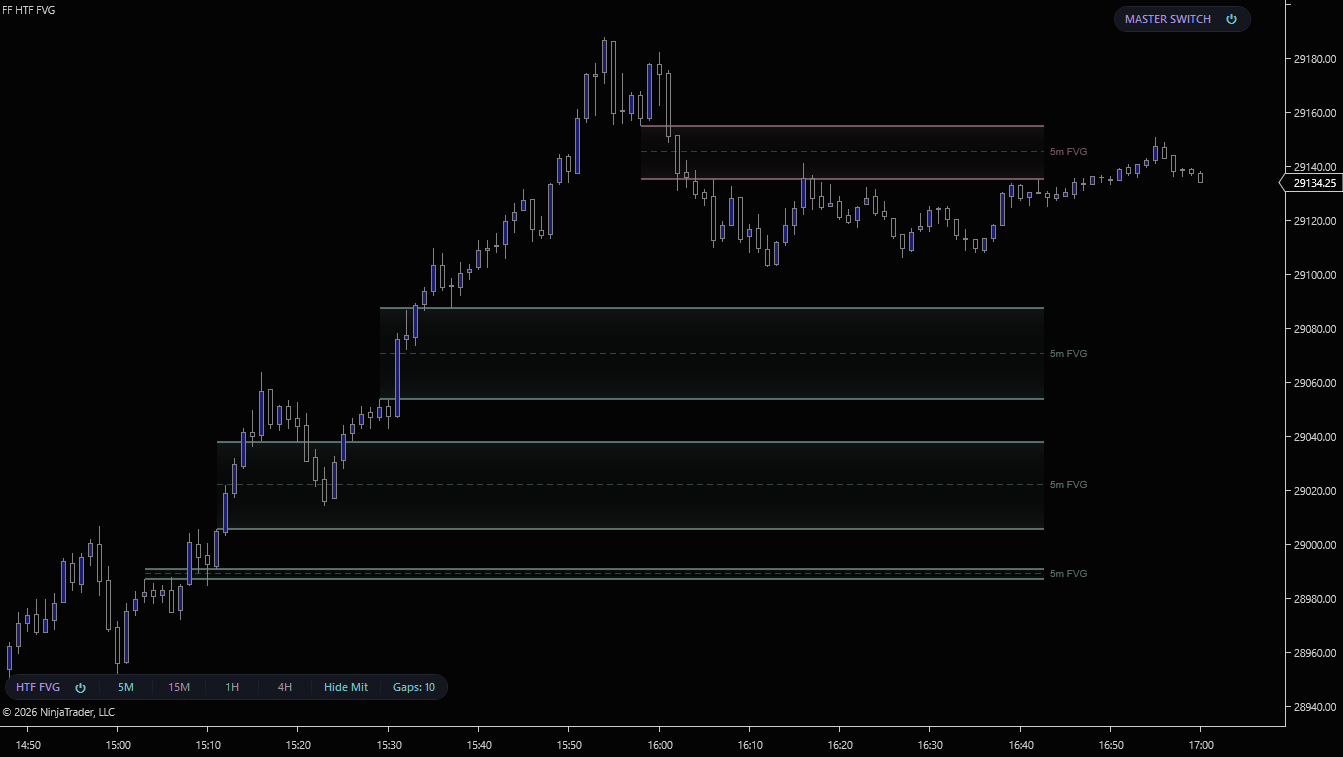
Every screenshot is the same 1-minute execution chart with a different higher-timeframe layer enabled. Click any to enlarge.
5-minute Fair Value Gaps drawn on a 1-minute NinjaTrader 8 chart
5m FVGs. Tight intraday imbalances for scalp-grade entries on the execution chart.
15-minute Fair Value Gaps with CE lines on a 1-minute NinjaTrader 8 chart
15m FVGs. The session's structural imbalances. Edge rails plus the dashed CE line at the midpoint.
1-hour Fair Value Gaps drawn on a 1-minute NinjaTrader 8 chart
1H FVGs. The daily-bias gaps. The zones intraday traders need to know about before they're touched.
4-hour Fair Value Gaps drawn on a 1-minute NinjaTrader 8 chart
4H FVGs. The swing-grade imbalances that define multi-session structure.
CHART TOOLBAR

Every control lives on the chart.

Power, four timeframe toggles, mitigation visibility, and a live gap-count limiter. All on a dark-themed pill anchored to your chart toolbar. No dialog, no restart, no parameter pane.
HTF FVG toolbar pill. Power, 5M, 15M, 1H, 4H, Hide Mit, Gaps N
Master power

Indicator-level on/off. Suppresses all rendering and pauses the engine without removing the indicator from the chart.

Per-timeframe toggles

5M / 15M / 1H / 4H pill buttons. Toggle each timeframe independently. Active ones glow, inactive ones dim. State persists across sessions.

Hide mitigated

Hides zones that price has closed or wicked through. Switch between close-through and wick-through mitigation modes in indicator settings.

Gaps N limiter

Click the value, type a new cap, Apply. Limits how many active gaps render per timeframe. Keep charts clean during congested sessions.

FEATURES

What you get

Four higher timeframes on one chart
5-minute, 15-minute, 1-hour, and 4-hour Fair Value Gaps drawn directly on your execution chart. Each timeframe runs as an independent secondary data series so gap detection is exact. Not interpolated from your chart's bars. Toggle any combination live; the indicator never needs to be removed or reconfigured.
Edge-rail rendering with CE line
Each zone is drawn as upper and lower edge rails with a subtle gradient fill between them. The gap boundary stays readable even when stacked over price action. A dashed consequent encroachment (CE) line marks the gap midpoint, the level institutions typically re-engage when price returns.
Mitigation tracking, two modes
Choose close-through or wick-through mitigation. Active zones extend to the right edge of the chart; mitigated zones either dim or hide entirely depending on the Hide Mit toggle on the toolbar. Keep the chart clean automatically as price works through the levels.
Per-timeframe gap-size filter
Set the minimum gap width (in ticks) independently per timeframe. Filter out micro-gaps on the 5m without losing structural zones on the 1H. Lets the indicator behave aggressively or conservatively based on which higher timeframe you're tracking.
Configurable labels per timeframe
Each timeframe gets its own label text and color. Default labels read "5m FVG", "15m FVG", "1H FVG", "4H FVG" so the chart stays self-documenting. Vertical alignment is configurable. Top, middle, or bottom of each zone.
SharpDX hardware-accelerated rendering
All zones are drawn through Direct2D with pooled brushes, cached gradient stops, and reused text layouts. Hundreds of stacked gaps render without flicker or lag. The indicator suspends automatically on inactive workspace tabs. No CPU spent on charts you can't see.
Instant warm starts
All four timeframes' zones persist to a local cache. Reopen the chart or restart NinjaTrader and every tracked gap — including mitigation state — reloads instantly instead of rebuilding from historical bars. The cache detects when your chart loads deeper history than it covers and rebuilds automatically, so a contract rollover never leaves you with shallow zones. Per-timeframe render styles (gradient edge, edge rails, standard fill) let each timeframe carry its own visual weight.
Behind-price Z-order
Zones render behind the candles so price action stays foreground-readable. Stacks cleanly with the rest of the FlowForged suite. Refine, Reclaim, Hammer, and Anvil all sit on top of HTF FVG without obscuring it.
REQUIREMENTS

What you need to run HTF FVG

RequirementDetails
PlatformNinjaTrader 8 on Windows. No Order Flow+ subscription required.
DataStandard data feed. Rithmic, CQG, Kinetick, or any NinjaTrader-compatible source. The indicator subscribes to its own 5m, 15m, 1H, and 4H bar series independent of your chart period.
Chart typeAny time-based or volume-based execution chart. Designed for low-timeframe trading (1m, tick, range) where higher-timeframe context is otherwise out of view.

Trade the timeframe you want. See the timeframes that matter.

Get HTF FVG as part of the FlowForged Suite.

Pairs well with Refine (volume-validated FVGs on your chart timeframe) and Displace (the continuation sequence after a 15m gap fires).

View Pricing ← All Indicators